Challenge Information
- Platform: OverTheWire (Bandit)
- Difficulty: Easy
- Category: Linux
Overview
There is a git repository at ssh://bandit31-git@bandit.labs.overthewire.org/home/bandit31-git/repo via the port 2220. The password for the user bandit31-git is the same as for the user bandit31.
From your local machine (not the OverTheWire machine!), clone the repository and find the password for the next level. This needs git installed locally on your machine.
Solution
Clone the repo
git clone ssh://bandit31-git@bandit.labs.overthewire.org:2220/home/bandit31-git/repo
Looking at the README.md
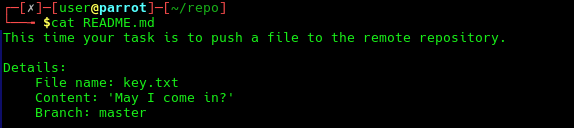
So lets create a file key.txt with the content "May I come in?" to the master branch. After creating the file we need to stage the file and commit it before pushing. We also need to remove *.txt from the .gitignore file to stop git from ignoring .txt files.
git add key.txt
git commit -m "Ask for key"
git push
Lessons Learned
- Pushing to commits to a remote repository.
Tools Used
sshgit