Challenge Information
- Platform: OverTheWire (Bandit)
- Difficulty: Easy
- Category: Linux
Overview
The password for the next level can be retrieved by submitting the password of the current level to port 30001 on localhost using SSL/TLS encryption.
Helpful note: Getting “DONE”, “RENEGOTIATING” or “KEYUPDATE”? Read the “CONNECTED COMMANDS” section in the manpage.
Solution
SSH into machine on port 2220 with password from previous level.
ssh -p 2220 bandit15@bandit.labs.overthewire.org
Begin by seeing if port 30001 is open using nmap.
nmap -p30001 localhost
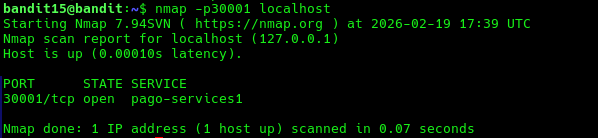
It is open so now we can try to connect to it using using SSL/TLS encryption. This can be done with openssl s_client command. Use the -ign_eof flag to treat input as pure data and not perform a local function such as KEYUPDATE.
openssl s_client -ign_eof localhost:30001
There will be a lot of output but at the bottom you will see read R BLOCK. Here input the password to get the next levels password.

Lessons Learned
- Use
openssl s_clientto connect using SSL/TLS encryption with-ign_eofflag.
Tools Used
sshncopenssl s_client