Challenge Information
- Platform: OverTheWire (Bandit)
- Difficulty: Easy
- Category: Linux
Overview
The credentials for the next level can be retrieved by submitting the password of the current level to a port on localhost in the range 31000 to 32000. First find out which of these ports have a server listening on them. Then find out which of those speak SSL/TLS and which don’t. There is only 1 server that will give the next credentials, the others will simply send back to you whatever you send to it.
Helpful note: Getting “DONE”, “RENEGOTIATING” or “KEYUPDATE”? Read the “CONNECTED COMMANDS” section in the manpage.
Solution
SSH into machine on port 2220 with password from previous level.
ssh -p 2220 bandit16@bandit.labs.overthewire.org
So we begin by scanning ports within that range using nmap -p and we also wanna show additional information on each found port using -sC so we can see what ports use SSL/TLS encryption.
nmap -p31000-32000 -sC localhost
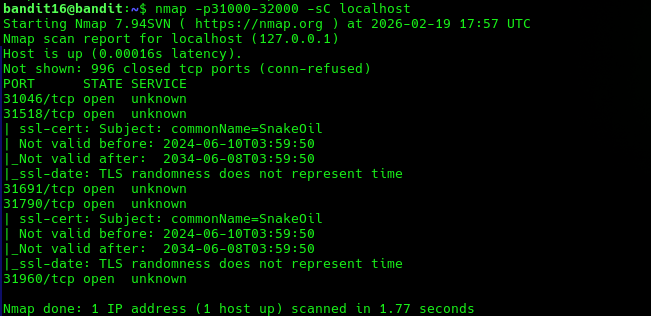
Here we see that there are 5 ports open within this range and two of them (31518 and 31790) uses SSL/TLS encryption.
Now we can try connecting to all of them and see which one works. To connect with SSL/TLS encryption I refer you to the previous write up.
In this it was port 31790 that was the correct port.
Lessons Learned
- Using
nmapto discover ports within an port range and also display more information about the open ports.
Tools Used
sshnmapopenssl s_client