Challenge Information
- Platform: OverTheWire (Bandit)
- Difficulty: Easy
- Category: Linux
Overview
A program is running automatically at regular intervals from cron, the time-based job scheduler. Look in /etc/cron.d/ for the configuration and see what command is being executed.
Solution
SSH into machine on port 2220 with password from previous level.
ssh -p 2220 bandit21@bandit.labs.overthewire.org
Look for configuration in /etc/cron.d/
ls -la /etc/cron.d/
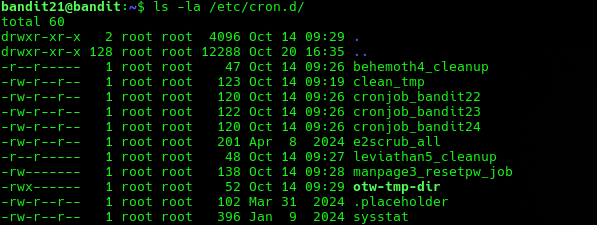
We see cronjob_bandit22 looks promising!
Next we cat this config to see what command is being executed.
cat /etc/cron.d/cronjob_bandit22

We see that /usr/bin/cronjob_bandit22.sh is being executed.
We can try to run the script but when I tried I did not have permission.
Let’s cat this script instead to see what it does.
cat /usr/bin/cronjob_bandit22.sh

It redirects the password of bandit22 to the file /tmp/t7O6lds9S0RqQh9aMcz6ShpAoZKF7fgv.
So now all we have to do to get password is to cat this file.
Lessons Learned
catscripts to see what they do you don’t always have to run them to get the information you need.
Tools Used
sshcatls