Challenge Information
- Platform: OverTheWire (Bandit)
- Difficulty: Easy
- Category: Linux
Overview
A program is running automatically at regular intervals from cron, the time-based job scheduler. Look in /etc/cron.d/ for the configuration and see what command is being executed.
NOTE: Looking at shell scripts written by other people is a very useful skill. The script for this level is intentionally made easy to read. If you are having problems understanding what it does, try executing it to see the debug information it prints.
Solution
SSH into machine on port 2220 with password from previous level.
ssh -p 2220 bandit22@bandit.labs.overthewire.org
Check to see what script is running in the configuration.
cat /etc/cron.d/cronjob_bandit23

We see /usr/bin/cronjob_bandit23.sh is being run. Let’s cat out the script and try to read it.
cat /usr/bin/cronjob_bandit23.sh
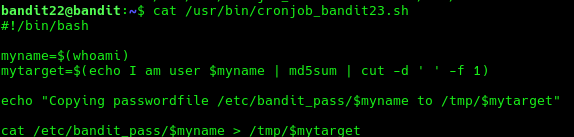
This script calculates a hash based on the string "I am user <username of user running the script>" and copies the password for the next level to the /tmp/ directory with the hash as the filename.
So to retrieve the password we need to find out the hash of the user. Since this is a cronjob configuration for bandit23 the user is also bandit23. The string we use to calculate the hash is therefore "I am user bandit23".
echo "I am user bandit23" | md5sum | cut -d ' ' -f 1

Here we get hash 8ca319486bfbbc3663ea0fbe81326349. Let’s cat out this file from the /tmp/ directory to get the password.
cat /tmp/8ca319486bfbbc3663ea0fbe81326349
Lessons Learned
- Reading shell script.
- Knowledge about
md5sum.
Tools Used
sshmd5sumcatls